Cisco Unified CCX
Relationship between the Unified CCX platform and the three products it supports
Three Cisco products supported by the Unified CCX engine platform
Unified CCX hardware and software components to include all server types, standby deployments, and scalability
New and improved functions of the three Unified CCX products to include Unified CCX v11.0
2. Designing and Ordering
Properly size the Unified CCX products by using calculators provided by Cisco
Properly order Unified CCX products using the Unified CCX configuration and ordering tool
Network considerations surrounding a Unified CCX deployment
Using the Solution Reference Network Design for Cisco Unified CCX and Cisco Unified IP IVR and other documents to support a Unified CCX design and deployment
3. Installation and Configuration
Installing Unified CCX software on all servers in a cluster
Activating and configuring all components in a CCX cluster
Configuring and testing a simple CCX Script Application
Troubleshooting installations using log files
4. Unified CCX Editor
Navigate the Unified CCX Editor functionality
Creating, deleting, and editing variables
Saving and uploading valid scripts to the repository
Performing the debug process to test a script
Troubleshooting an application and script using trace files
5. Basic Unified CCX Editor Steps
Creating a simple script workflow to answer a call
Adding comments to identify and explain the script and subsequent groups of steps
Playing voice prompts to share information or instructions with callers
Terminating and ending a call
Validate, save as, upload, refresh, and debug a script
6. Caller and System Inputs
Collecting information from a caller by presenting a list of choices using the menu step
Collecting digits from a caller by using the Get Digit String step
Getting information from the system to alter the logic of the call flow
Validate, save as, upload, refresh, and debug the script
7. Database Access
Connecting to a database
Reading and getting information from the database by creating a SQL query within a script step
Referencing database locations
Writing information to a SQL database
Closing the database connection and terminating database resources
8. Logical Operations
Applying Boolean logic in scripts
Creating and modifying counters
Creating and managing timing loops
Redirecting script logic based on the evaluation of “If” statements
Using call subflows as reusable scripts
Creating specialized prompts
9. Caller Transfers
Creating day-of-week and time-of-day ranges for different handling
Transferring calls to various extensions as a function of day and time
Getting information associated with a call
Designating calls as completed for reporting
Determining if the caller has hung up
Determining if today is a holiday
10. Configuring Unified CCX
Cisco Unified CCX product, features, and capabilities
Configuring Unified CCX on the CUCM and CCX server
11. Finesse Product Suite
Configuring Finesse Agent Desktop and Finesse Supervisor Desktop
Testing the Finesse Agent Desktop and Finesse Supervisor Desktop configurations
Examining the IP Phone Agent
12. Unified CCX Script Techniques
Defining and using Unified CCX Editor Unified CCX steps
Testing a sample application using the Unified CCX steps in the Unified CCX Editor
13. Finesse Administrator
Configuring the Unified CCX enterprise data using the Finesse Desktop Administrator
Configuring work flows, personnel, and teams
Creating screen pops and macros
Creating wrap-up codes
14. Outbound Dialer and Agent Chat
Examine Outbound Dialer
15. Session Management
Examine Session Management to retrieve information from a previous call
16. Media Resource Control Protocol (MRCP) Speech Technologies
Examine Nuance ASR and TTS servers
17. Reporting
Accessing and analyzing real-time reports
Configure Cisco Unified Intelligence Center (CUIC) historical reporting
Accessing and analyzing historical reports
18. Servicing and Troubleshooting
Traces and logs
DAY 1 — COLLAB SOLUTION DESIGN, SIP & MEDIA, ENDPOINTS, REGISTRATION, & CORE TROUBLESHOOTING
1. Collaboration Solution Architecture
- On-prem, hybrid & cloud models
- Connected UC architecture for mixed Cisco/Webex environments
- Solution sizing & bandwidth planning
- Media & codec planning (Opus, G.711, G.729, H.264, AV1)
- High Availability & Disaster Recovery (SRST, CUBE HA, CUCM Clustering)
- Security architecture: TLS, SRTP, OAuth, SSO, certificate chains
2. SIP, SDP & Media Troubleshooting
- SIP call setup/teardown
- SDP audio/video negotiation
- PRACK, UPDATE, re-INVITE
- DTMF (RFC 2833/4733)
- NAT traversal: STUN / TURN / ICE
- Early-Offer vs Delayed-Offer
- Session timers, retries & refresh
3. Network Foundations Troubleshooting
- DNS A/SRV/NAPTR
- DHCP Options 150/66
- NTP drift issues
- LDAP sync & authentication failures
- CDP/LLDP endpoint detection
- Firewall/NAT restrictions affecting signaling/media
4. Endpoint & Registration
- Manual provisioning
- Self-provisioning
- Activation code onboarding
- Webex App / MPP onboarding
- Registration failure triage
DAY 1 HANDS-ON LABS — FOUNDATION DEPLOYMENT
- Deploy CUCM Publisher + Subscriber
- Configure DNS, NTP, DHCP option 150
- Register SIP endpoints via auto-registration & activation code
- Analyze SIP REGISTER & INVITE using utils network capture & CUBE debugs
- Troubleshoot registration failures (DNS, SRV, NAT, certificates)
- Validate media path & DTMF negotiation
DAY 2 — GLOBALIZED ROUTING, DIAL PLAN TROUBLESHOOTING, UNITY, USER MANAGEMENT
1. CUCM Globalized Call Routing
- Route patterns (traditional & +E.164)
- Translation patterns & transformations
- Local Route Groups (LRG)
- Time-of-Day routing
- CSS & Partitions
- Forced Authorization Codes
- Urgent Priority call matching
- Toll-fraud mitigation
- IPv4/IPv6 routing logic
2. CUCM Monitoring & Troubleshooting Tools
- Dialed Number Analyzer (DNA)
- RTMT call diagnostics
- Call flow tracing (SDL/SDI)
- SIP ladder debug on CUCM
3. Unity Connection
- Mailboxes & MWI
- Call handlers & routing rules
- SIP integration troubleshooting
4. On-Premises User Management
- LDAP sync & authentication
- RBAC roles
- Directory URI, ILS & GDPR replication
- Directory Connector
- Microsoft Azure Integration
DAY 2 HANDS-ON LABS — DIAL PLAN & UNITY
- Build a multi-site globalized dial plan
- Implement LRG, ToD routing & FAC
- Configure Unity voicemail & MWI
- Use DNA to troubleshoot failed calls
- Break-fix: CSS misconfig, blocked patterns, wrong translations
- Resolve voicemail routing issues
DAY 3 — IOS XE GATEWAY, CUBE, SRST, MEDIA RESOURCES & INTEROPERABILITY
1. IOS XE Voice Gateway Fundamentals
- VoIP & POTS dial peers
- Codec preference lists
- DTMF methods
- SIP profiles & header manipulation
- Voice translation rules
- Redundancy (server groups, DNS SRV)
2. CUBE Enterprise Features
- TLS secure SIP trunks
- Media flow-around vs flow-through
- SIP header & signaling modifications
- DTMF interoperability
- EO/DO negotiation
- URI dialing & E.164 pattern maps
- Dial-peer groups
- Hunt-stop troubleshooting
- Multi-VRF voice deployments
- LTI transcoders
3. UCME & SRST
- Deploy UCME
- Configure SIP SRST
- Failover & fallback routing
4. IOS XE Media Resources
- Transcoders
- Conference bridges
- MTP & redundancy
DAY 3 HANDS-ON LABS — CUBE / SRST / MEDIA
- Configure a complete CUBE PSTN gateway
- Deploy TLS/SRTP secure trunking
- Implement E.164 & URI routing
- Debug dial-peer matching & DTMF issues
- Simulate WAN failure & test SRST
- Configure MTP, transcoder, conferencing
- Analyze media/signaling with:
- debug ccsip messages
- debug voip ccapi inout
- show call active voice
DAY 4 — EXPRESSWAY MRA, B2B, ENCRYPTION, HYBRID SERVICES & CLOUD TROUBLESHOOTING
1. Expressway Core Architecture
- MRA registration flow
- Traversal zones & firewall design
- DNS A/SRV/NAPTR for B2B
- Certificates & ACME automation
- Zone encryption & media policies
- IPv4 ↔ IPv6 signaling/media interworking
2. Expressway Troubleshooting
- MRA registration failures
- TLS handshake & certificate issues
- Traversal zone misconfigurations
- ICE media path failures
- NAT traversal & port constraints
- SIP routing & search rules
3. B2B Collaboration
- Neighbor zones
- DNS zones
- Transform rules
- SIP trunk integration
- Video interop scenarios
4. Cloud Connected UC + Hybrid Services
- Directory Connector
- Hybrid Calling for on-prem endpoints
- Cloud user provisioning & RBAC
- Meetings & Messaging troubleshooting
- QoS, MOS/Jitter/Packet-loss analysis
DAY 4 HANDS-ON LABS — MRA & B2B
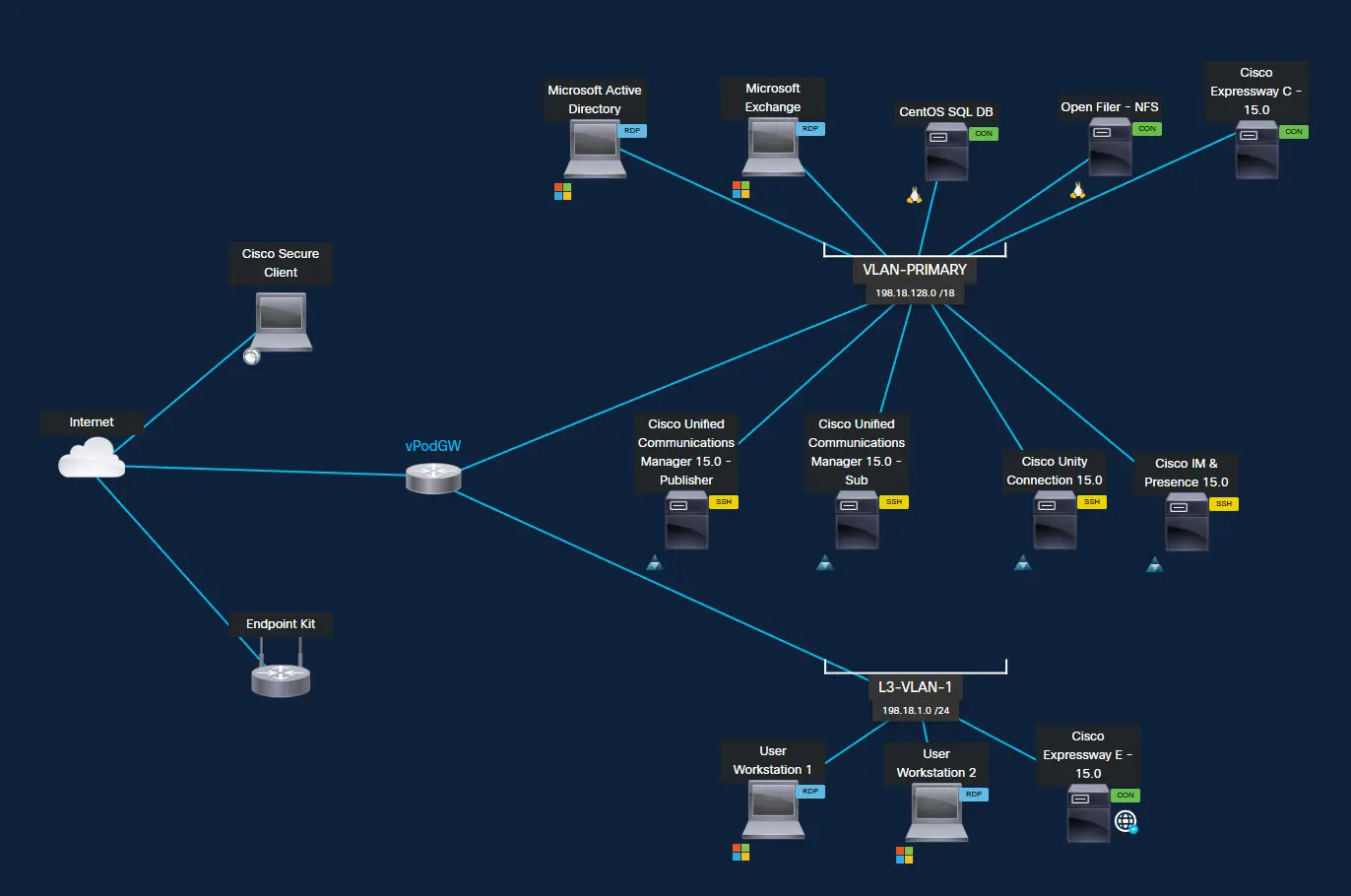
- Deploy Expressway-C/E
- Configure MRA & register remote endpoints
- Build B2B calling using SRV/NAPTR
- Break-fix cert issues & traversal failures
- Validate media path & ICE flows
- Enable Hybrid Calling for on-prem devices
- Generate meeting failures & troubleshoot
DAY 5 — WEBEX CALLING, WEBEX CONTACT CENTER, CONNECTED UC MIGRATION, APIs & AI
1. Webex Calling Architecture
- Trunks, route groups & dial plans
- Operating modes
- Multisite routing & location design
- Toll-fraud prevention
- Survivability: SRST / Local Gateway (LGW)
2. Webex Contact Center (Cloud CX)
- Channels, queues, teams
- Voice flow design
- Digital channels (chat, email, SMS, social)
- PSTN options: LGW, CCP, Webex Calling
- Routing logic, skills & agent behavior
- Supervisor tools, recording & compliance
3. Connected UC for On-Prem to Cloud Migration
- Migrating CUCM dial plan to Webex Calling
- Hybrid numbers & directory sync
- Reusing on-prem gateways as Local Gateway
- Cloud Connected UC analytics for migration readiness
- Identity & device migration
- Coexistence between CUCM and Webex Calling
- Troubleshooting hybrid call routing
4. Advanced Integrations & APIs
- Webex REST APIs (Calling, Messaging, Meetings)
- People & Events APIs
- Webhooks
- SCIM provisioning
- OAuth token workflows
- CRM/ITSM integration patterns
5. AI in Webex Collaboration
- Meeting & messaging summaries
- Noise removal & optimization
- Agent assist insights
- AI Agent & workflow automation
- Custom AI-driven event triggers
DAY 5 HANDS-ON LABS — ADVANCED FLOW, MIGRATION, API & AI
- Configure Webex Calling dial plan with LGW
- Test PSTN failover & survivability
- Build migration-ready hybrid dial plan
- Create Webex Contact Center call & digital flows
- Build callback routing
- Integrate external CRM using HTTP Request
- Deploy webhook event notifications
- Explore AI insights & agent assist
- Create simple API reporting integration