
Cisco UCCE Training
Administering Advanced Cisco Contact Center Enterprise
The Administering Advanced Cisco Contact Center Enterprise (CCEAA) v1.0 course teaches you how to execute advanced administration tasks associated with the Cisco® Contact Center Enterprise (CCE) solution through an in-depth examination of technical and operational requirements, and of the tools used to configure and ensure CCE solution functionality.
What is included:
- 5-days intensive instructor-led
- 200 hours of dedicated lab access
- Dual CCIE certified instructor
- 2-year retake policy
- 5 Years of eLearning for UCaaS, CCaaS & CPaaS Access.
| Course | Course Date | Location | Register |
|---|---|---|---|
| Cisco WebEx Calling Training | 05-18-2026 9:30 am | Online (Live) - Dubai, UAE | Register |
| Cisco WebEx Calling Training | 06-01-2026 9:30 am | Online (Live) – Pacific Standard Timezone GMT -5 | Register |
| Cisco WebEx Calling Training | 08-03-2026 9:30 am | Online (Live) – Eastern Standard Timezone GMT -5 | Register |
| Cisco WebEx Calling Training | 08-17-2026 9:30 am | Online (Live) - Dubai, UAE | Register |
| Cisco WebEx Calling Training | 09-07-2026 9:30 am | Online (Live) – Pacific Standard Timezone GMT -5 | Register |
| Cisco WebEx Calling Training | 11-02-2026 9:30 am | Online (Live) – Eastern Standard Timezone GMT -5 | Register |
| Cisco WebEx Calling Training | 11-16-2026 9:30 am | Online (Live) - Dubai, UAE | Register |
| Cisco WebEx Calling Training | 12-07-2026 9:30 am | Online (Live) – Pacific Standard Timezone GMT -5 | Register |
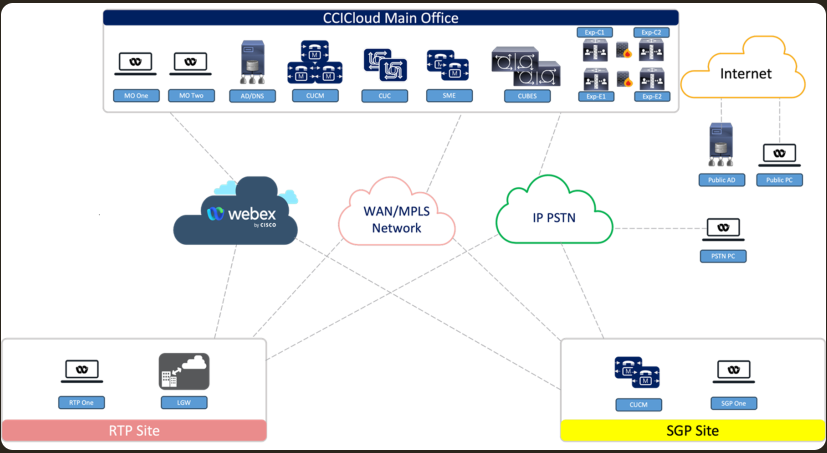
CCIE Collaboration 3.2 Topology
Module 1 – PCCE Review
PCCE Architecture and Components Review
PCCE Protocols Review
PCCE Call Flow Review
PCCE Access Tools Review
Discovery 01-1: Review Discovery
Discovery 01-2: Navigating CCE Discovery Architecture and Components
Module 2 – Introducing Bulk Import Tools
Use the PCCE Bulk Import Tool
Use Bulk Import Templates
Discovery 02-1: Importing Bulk Data
Module 3 – Configuring Advanced Scripting and CCE Data Exchange
Design for Advanced Scripting
CCE Data Exchange
Using Call Studio
Implement Database Lookup using VXML
Collect Response from the Caller
Invoking Call Studio Applications with CCE Routing Scripts
Discovery 3-01 Creating VXML Application using Call Studio
Discovery3-02 Configure Precision Queues
Discovery 3-03 Creating CCE Routing Script
Discovery 3-04 Customizing Finesse Desktop
Discovery 3-05 Testing your Call Flow
Module 4 – CUCM Initiated Call Flows
Understand Transfer Types and CVP Call Flow Models
Describe Subsequent Transfers
Perform UCM Configurations for Transfers
Configure CUCM as Routing Client and Agent Transfers
Discovery 4-01 Configure CUCM as Routing Client and Agent Transfers
Module 5 – Using Gadgets to Customize the Finesse Desktop
Obtain Finesse Custom Gadgets
Deploy Finesse Custom Gadgets
Discovery 5-01 Deploying Finesse Gadgets
Module 6 – Implementing Mobile Agent
Examining Mobile Agent Functionality
Identify Mobile Agent Architecture and Components
Configuring Mobile Agent
Logging in as Mobile Agent
Planning Mobile Agent Design and Integration
Discovery 6-01 Implementing Mobile Agent
Module 7 – Implementing Post Call Survey
Examining Post Call Survey Functionality
Configuring Post Call Survey
Reporting Considerations for Post Call Survey
Discovery 7-01 Implementing Post Call Survey
Module 1 – PCCE Review
PCCE Architecture and Components Review
PCCE Protocols Review
PCCE Call Flow Review
PCCE Access Tools Review
Discovery 01-1: Review Discovery
Discovery 01-2: Navigating CCE Discovery Architecture and Components
Module 2 – Introducing Bulk Import Tools
Use the PCCE Bulk Import Tool
Use Bulk Import Templates
Discovery 02-1: Importing Bulk Data
Module 3 – Configuring Advanced Scripting and CCE Data Exchange
Design for Advanced Scripting
CCE Data Exchange
Using Call Studio
Implement Database Lookup using VXML
Collect Response from the Caller
Invoking Call Studio Applications with CCE Routing Scripts
Discovery 3-01 Creating VXML Application using Call Studio
Discovery3-02 Configure Precision Queues
Discovery 3-03 Creating CCE Routing Script
Discovery 3-04 Customizing Finesse Desktop
Discovery 3-05 Testing your Call Flow
Module 4 – CUCM Initiated Call Flows
Understand Transfer Types and CVP Call Flow Models
Describe Subsequent Transfers
Perform UCM Configurations for Transfers
Configure CUCM as Routing Client and Agent Transfers
Discovery 4-01 Configure CUCM as Routing Client and Agent Transfers
Module 5 – Using Gadgets to Customize the Finesse Desktop
Obtain Finesse Custom Gadgets
Deploy Finesse Custom Gadgets
Discovery 5-01 Deploying Finesse Gadgets
Module 6 – Implementing Mobile Agent
Examining Mobile Agent Functionality
Identify Mobile Agent Architecture and Components
Configuring Mobile Agent
Logging in as Mobile Agent
Planning Mobile Agent Design and Integration
Discovery 6-01 Implementing Mobile Agent
Module 7 – Implementing Post Call Survey
Examining Post Call Survey Functionality
Configuring Post Call Survey
Reporting Considerations for Post Call Survey
Discovery 7-01 Implementing Post Call Survey
Module 1 – PCCE Review
PCCE Architecture and Components Review
PCCE Protocols Review
PCCE Call Flow Review
PCCE Access Tools Review
Discovery 01-1: Review Discovery
Discovery 01-2: Navigating CCE Discovery Architecture and Components
Module 2 – Introducing Bulk Import Tools
Use the PCCE Bulk Import Tool
Use Bulk Import Templates
Discovery 02-1: Importing Bulk Data
Module 3 – Configuring Advanced Scripting and CCE Data Exchange
Design for Advanced Scripting
CCE Data Exchange
Using Call Studio
Implement Database Lookup using VXML
Collect Response from the Caller
Invoking Call Studio Applications with CCE Routing Scripts
Discovery 3-01 Creating VXML Application using Call Studio
Discovery3-02 Configure Precision Queues
Discovery 3-03 Creating CCE Routing Script
Discovery 3-04 Customizing Finesse Desktop
Discovery 3-05 Testing your Call Flow
Module 4 – CUCM Initiated Call Flows
Understand Transfer Types and CVP Call Flow Models
Describe Subsequent Transfers
Perform UCM Configurations for Transfers
Configure CUCM as Routing Client and Agent Transfers
Discovery 4-01 Configure CUCM as Routing Client and Agent Transfers
Module 5 – Using Gadgets to Customize the Finesse Desktop
Obtain Finesse Custom Gadgets
Deploy Finesse Custom Gadgets
Discovery 5-01 Deploying Finesse Gadgets
Module 6 – Implementing Mobile Agent
Examining Mobile Agent Functionality
Identify Mobile Agent Architecture and Components
Configuring Mobile Agent
Logging in as Mobile Agent
Planning Mobile Agent Design and Integration
Discovery 6-01 Implementing Mobile Agent
Module 7 – Implementing Post Call Survey
Examining Post Call Survey Functionality
Configuring Post Call Survey
Reporting Considerations for Post Call Survey
Discovery 7-01 Implementing Post Call Survey


